Navigating the Map
Use two fingers to pinch and zoom to zoom in and out on the map. Use one finger to drag the map around to show more locaitons.
Click on any location to show the details of that location.
Click the magnifying glass to show the search bar. Type in a word or words to search. You can search for many different terms, including:
- Room Number
- Lot Number
- Lot Type - Ranch Estate or Ranchette or Residence
- Building Names
- Activity Types such as 'Shooting' or 'Swimming'
- Restrooms
- Suite Names
- Residence Model Name - like 'Ford' or 'Beck'
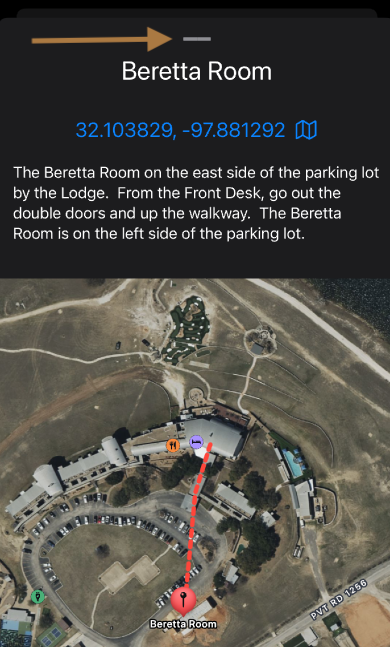
Clicking on a location icon will show the details for that location. Most detail pages include directions from the front desk to that location.
If you click on the GPS coordinates in blue at the top of the screen, it will open the Maps app and provide directions from wherever you are to that location.
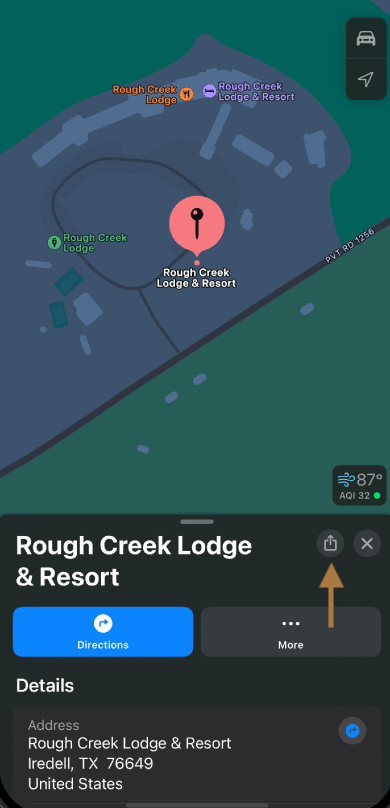
Click on the share icon to easily share the directions with a guest.
Close the detail screen by swiping down on the grab bar.